
Compaq ProLiant DL380 Setup and Installation Guide
Installing the ProLiant DL380 Server
2-7
Compaq Confidential – Need to Know Required
Writer:
Gilbert Saldivar
Project:
Compaq ProLiant DL380 Setup and Installation Guide
Comments:
Part Number:
120133-002
File Name:
c-ch02 Server Installation Overview.doc
Last Saved On:
12/10/99 1:04 PM
Other options include additional memory, hard drives, power supplies,
expansion boards, and external storage devices. See Chapter 3,
“Installing Hardware Options.” See the options kits for detailed
instructions. Before you run the System Configuration Utility, install
hardware options (with the exception of additional memory and most
PCI boards). The System Configuration Utility is run during the
SmartStart portion of the installation sequence.
5.
Set the switches.
These switches include system board switches and SCSI ID settings, if
changes are required. See Chapter 3, “Installing Hardware Options.”
6.
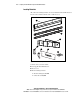
Attach rack mounting hardware to the rack and to the server.
7.
Mount the server into the rack.
8.
Attach the cable management arm to the rack.
9.
Connect the cables.
These cables include keyboard, mouse, monitor, network, and power
cables.
10.
Start the computer and allow default configuration or insert the
SmartStart and Support Software CD to configure the server.
When the server boots from the SmartStart program, it automatically
starts the initialization procedures, refer to the Server Setup and
Management pack shipped with your server. When the utility is
completed, you will be prompted to turn the server off (any switch
settings required will be provided by the System Configuration Utility),
and then boot the server from the SmartStart program.
11.
Install Compaq Insight Manager to manage the server.
For Compaq Management CD initialization procedures, refer to the
Server Setup and Management pack shipped with your server.
12.
Register your server.
You can register your server from the Compaq website
http://www.compaq.com
Unpacking the Rack Server
Unpack the server box and locate the materials and documentation necessary
to install your server.