
Compaq ProLiant DL380 Setup and Installation Guide

1-20
Compaq ProLiant DL380 Setup and Installation Guide
Compaq Confidential – Need to Know Required
Writer:
Gilbert Saldivar
Project:
Compaq ProLiant DL380 Setup and Installation Guide
Comments:
Part Number:
120133-002
File Name:
b-ch01 Server Features.doc
Last Saved On:
12/10/99 1:03 PM
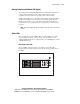
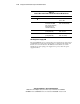
Table 1-7
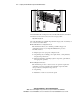
Status LEDs on the Front Panel of the ProLiant DL380 Server
Number
LED Description
Status
1
Power ON/STANDBY Status
Amber = STANDBY
Green = ON
2
Disk drive activity,
including the CD-ROM
drive, hot-plug hard drive,
and SCSI devices in
removable media area
Green = Drive Activity
OFF = No Drive Activity
3
Network link status
(of integrated NIC)
Green = Linked to Network
OFF = No Link
4
Network activity status
(of integrated NIC)
Green = Network activity
OFF = No activity
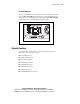
Hot-Plug Power Supply LED
The single LED indicator on each hot-plug power supply has two states: Green
and Off. The Green state indicates that power is connected to this supply and
that the server is in the On state. The Off state means that the server is in
Standby mode, the hot-plug power supply has no power, and/or the power
supply has failed.