
Compaq ProLiant DL380 Setup and Installation Guide

Server Features
1-13
Compaq Confidential – Need to Know Required
Writer:
Gilbert Saldivar
Project:
Compaq ProLiant DL380 Setup and Installation Guide
Comments:
Part Number:
120133-002
File Name:
b-ch01 Server Features.doc
Last Saved On:
12/10/99 1:03 PM
B
A
B
3
2
1
0
1
3
2
2
A
4
5
1
0
3
5
4
1
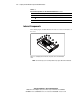
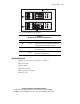
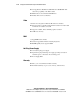
Figure 1-9. ProLiant DL380 server drive positions
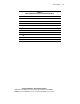
Table 1-6
Media Bays for the ProLiant DL380 Server
Number
SCSI IDs
Configuration
1 0, 1, 2, 3 Hot-Plug drive cage accommodating four 1-inch height
Compaq Wide Ultra2 SCSI hot-plug hard drives
2 A, B Two 5.25-inch wide x half-height drive bays
(removable media area)
3
4 and 5
Optional cage which supports two 1-inch Compaq Wide
Ultra2 SCSI hot-plug hard drives
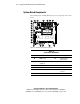
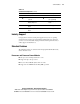
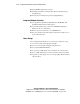
Standard Interfaces
■
Integrated Smart Array Controller (Port 1 and Port 2)
■
Serial (2) (teal)
■
Video (blue)
■
Parallel (burgundy)
■
Hot-plug keyboard (purple)
■
Mouse (green)