
Compaq ProLiant DL380 Setup and Installation Guide

D-2
Compaq ProLiant DL380 Setup and Installation Guide
Compaq Confidential – Need to Know Required
Writer:
Gilbert Saldivar
Project:
Compaq ProLiant DL380 Setup and Installation Guide
Comments:
Part Number:
120133-002
File Name:
l-appd Switches and Jumpers.doc
Last Saved On:
12/10/99 1:15 PM
Processor Configuration Switch Settings
(SW1 Settings)
Processor switch settings are preconfigured for shipping. If the processor is
replaced, or if another processor is added, the system automatically detects and
configures switch settings.
System Configuration Switch Settings
(SW2 Settings)
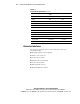
The following table defines the function for each switch setting on SW2.
Table D-1
System Configuration Switch Settings
(ON Activates the Function)
Switch Position Function Default Position
1 Embedded Video Disable OFF
2 Configuration Lock OFF
3 Rack Mount ON
4 Diskette Drive Override OFF
5 Password Disable OFF
6 Maintenance OFF
NIC Operating Mode
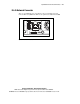
ProLiant DL380 servers come standard with the NC3163 Fast Ethernet
Embedded 10/100 WOL network interface controller (NIC). The controller
automatically differentiates between the 10-Mbit and 100-Mbit environments
when the RJ-45 connector is used.