
Compaq ProLiant DL380 Setup and Installation Guide
Compaq Confidential – Need to Know Required
Writer:
Gilbert Saldivar
Project:
Compaq ProLiant DL380 Setup and Installation Guide
Comments:
Part Number:
120133-002
File Name:
l-appd Switches and Jumpers.doc
Last Saved On:
12/10/99 1:15 PM
Appendix
D
Switches and Jumpers
When you add or remove a component or change a security feature, you must
reconfigure the computer to recognize these changes. If the system
configuration is incorrect, your computer may not work properly and you may
receive error messages on the screen. Setting the system board switches is part
of the reconfiguration process, along with running the System Configuration
Utility.
Setting System Board Switches
The Compaq ProLiant DL380 server has two switch banks (1 and 2) located
on the system board that are used to set the overall configuration of your
server.
■
The process configuration switch (SW1) is an eight-position switch
(S1-S8) that provides the processor switch settings of your server.
The server autodetects and configures processor switch settings.
■
The system configuration switch 2 (SW2) is a six-position switch that is
used for system configuration.
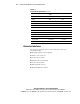
Refer to the labels on the inside of the system unit cover or to the
following table for the proper system configuration switch settings.