
Compaq ProLiant DL380 Setup and Installation Guide

C-2
Compaq ProLiant DL380 Setup and Installation Guide
Compaq Confidential – Need to Know Required
Writer:
Gilbert Saldivar
Project:
Compaq ProLiant DL380 Setup and Installation Guide
Comments:
Part Number:
120133-002
File Name:
k-appc Installing a New Battery.doc
Last Saved On:
12/10/99 1:16 PM
Installing the System Board Battery
To install the new battery, complete the following steps:
1. If the server is on, place it in standby mode and disconnect the power.
Refer to Chapter 2, “Installing the ProLiant DL380 Server,” for detailed
instructions on preparing the server for installation or upgrade.
2. Pull the server forward in the rack for access to the inside of the server.
3. Remove the server cover.
4. Locate the battery holder on the system board.
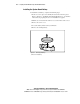
5. Remove the existing battery.
Figure C-1. Removing old battery
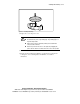
6. Insert new battery.