
Compaq ProLiant DL380 Setup and Installation Guide

Cabling Guidelines
5-13
Compaq Confidential – Need to Know Required
Writer:
Gilbert Saldivar
Project:
Compaq ProLiant DL380 Setup and Installation Guide
Comments:
Part Number:
120133-002
File Name:
f-ch05 Cabling Guidelines.doc
Last Saved On:
12/10/99 1:12 PM
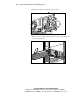
Internal Cabling
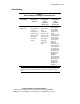
Table 5-4
Internal Cabling for the Compaq ProLiant DL380 Server
Compaq
ProLiant DL380
DAT drive, SLR
drive, DLT drive,
AIT drive
Wide Ultra2 SCSI
hot-plug hard
drives
(in standard
4x1-inch cage)
Wide Ultra2 SCSI
hot-plug hard
drive
(in optional
2x1-inch cage)
Integrated Smart
Array Controller
No additional
cables required.
Connect the
two-device cable
in the server from
SCSI Port 1 to the
drive. Use the
68-50 SCSI
adapter.
No additional
cables required.
Use the
point-to-point
SCSI cable in the
server to connect
SCSI Port 2 to the
standard Wide
Ultra2 SCSI
hot-plug back
plane.
Required cables
shipped with the
2x1-inch Wide
Ultra2 SCSI drive
cage option kit.
Use the
point-to-point SCSI
cable in the server
to connect SCSI
Port 2 to the lower
SCSI port on the
option cage
backplane.
Connect the short
point-to-point SCSI
cable, supplied in
the option kit, from
the top SCSI port
on the option cage
backplane to the
standard cage
backplane.
Connect the signal
cable, supplied in
the option kit, from
the option cage
backplane to the
standard cage
backplane.
IMPORTANT:
All hot-plug hard drives are installed in the hot-plug drive cages only. The
DAT drive, SLR drive, AIT drive, and DLT drive, are installed in removable media bays
only.