
Compaq ProLiant DL380 Setup and Installation Guide

Cabling Guidelines
5-11
Compaq Confidential – Need to Know Required
Writer:
Gilbert Saldivar
Project:
Compaq ProLiant DL380 Setup and Installation Guide
Comments:
Part Number:
120133-002
File Name:
f-ch05 Cabling Guidelines.doc
Last Saved On:
12/10/99 1:12 PM
SCSI Cabling Guidelines
Determining the Cables You Need
The following guidelines are provided as an overview for first-time cable
connections and installation in the ProLiant DL380 server. The
ProLiant DL380 server supports only controllers listed in the following tables.
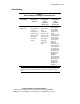
Refer to the following tables to determine the parts that are necessary for
successful cabling of the ProLiant DL380 server.
To customize the cabling needs of your Compaq ProLiant DL380 server to
your specific application, use the following procedure:
1.
Determine whether the cabling needs are internal or external.
2.
Determine whether cabling needs are for primary storage (hard drive) or
for secondary storage (tape drive or CD-ROM drive).
3.
Identify the controller type.
4.
Identify the drive type to be used:
! Wide Ultra2 SCSI hard drive
! Tape drive
! CD-ROM drive
5.
Refer to the appropriate entry of the SCSI cable usage table on the
following pages to determine the correct usage and routing of the cables
specific to your situation.
IMPORTANT:
Only those controllers listed in the SCSI Cable Usage Tables are supported
by Compaq ProLiant DL380 servers.
Cabling examples are described in the following tables and are then
graphically shown later in this chapter in the “ProLiant DL380 Cabling
Examples” section.