
Compaq ProLiant DL380 Setup and Installation Guide

Cabling Guidelines
5-3
Compaq Confidential – Need to Know Required
Writer:
Gilbert Saldivar
Project:
Compaq ProLiant DL380 Setup and Installation Guide
Comments:
Part Number:
120133-002
File Name:
f-ch05 Cabling Guidelines.doc
Last Saved On:
12/10/99 1:12 PM
Rear Panel Connectors
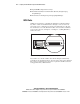
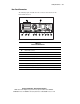
The following figure and table show the connectors and switches for the
ProLiant DL380 server.
1 2 3 4 5 6 7 8 9 10
11
12
Figure 5-1. Location of rear panel connectors
Table 5-1
Rear Panel Connectors
Number Connector
1
External SCSI connector
2
Video connector (blue)
3
RJ-45 Fast Ethernet connector with 10/100-Mbit/s operation, with LED
4
Parallel connector (burgundy)
5
Serial connector B (teal)
6
Serial connector A (teal)
7
Hot-plug keyboard connector (purple)
8
Mouse connector (green)
9
Hot-plug redundant power supply bay (supports optional power supply 2)
continued