
Compaq ProLiant DL380 Setup and Installation Guide

4-2
Compaq ProLiant DL380 Setup and Installation Guide
Compaq Confidential – Need to Know Required
Writer:
Gilbert Saldivar
Project:
Compaq ProLiant DL380 Setup and Installation Guide
Comments:
Part Number:
120133-002
File Name:
e-ch04 Integrated Smart Array Controller.doc
Last Saved On:
12/10/99 1:12 PM
■
Option ROM Configuration for Arrays
■
Pre-Failure Notification and Pre-Failure Warranty through Compaq
Insight Manager
■
Performance monitoring through Compaq Insight Manager
SCSI Ports
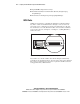
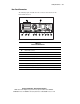
SCSI Port 2 is dedicated to controlling the SCSI drives in the internal drive
bay. Port 1 controls external SCSI devices through a connector on the rear
panel of the server or internal devices in the removable media area. In order
for external devices to work, all internal cables connected to Port 1 will first
need to be disconnected. See Figure 5-2 of Chapter 5, “Cabling Guidelines,”
for Port 1 location.
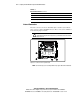
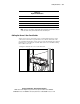
Figure 4-1. Locating the external SCSI connector on the rear panel
If you wish to use a SCSI controller other than the Integrated Smart Array
Controller for the internal hard drives, disconnect the point-to-point cable from
Port 2 of the system board and connect it to an optional controller such as the
Compaq Smart Array 3200 Controller.