
Compaq ProLiant DL380 Setup and Installation Guide

3-30
Compaq ProLiant DL380 Setup and Installation Guide
Compaq Confidential – Need to Know Required
Writer:
Gilbert Saldivar
Project:
Compaq ProLiant DL380 Setup and Installation Guide
Comments:
Part Number:
120133-002
File Name:
d-ch03 Installing Hardware Options.doc
Last Saved On:
12/10/99 1:11 PM
7.
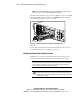
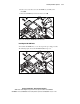
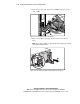
Insert the switch into the front bezel 2, as shown. Make sure that you
include the spring, the clips on the switch engage, and the center post of
the switch aligns with the hole in the bezel.
1
2
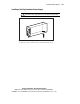
Figure 3-33. Inserting the power switch into the front bezel
8.
Replace the 1.44-MB diskette drive and connect cabling.
9.
Replace the server access panel, slide and secure the server into the rack,
and connect external cables.
Replacing the CD-ROM Drive
The following procedure provides instructions for removing and installing the
CD-ROM drive.
Removing the CD-ROM Drive
1.
If the server is on, place it in Standby mode and disconnect the power
cord(s). See Chapter 2, “Installing the ProLiant DL380 Server.”
2.
Pull the server forward in the rack for access to the inside of the server.
3.
Remove the server access panel.
4.
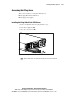
Remove the 1.44-MB diskette drive to access the screw that secures the
CD-ROM drive. See “Replacing the 1.44-MB Diskette Drive” for
details.
5.
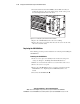
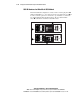
Disconnect the CD-ROM cable 1.