
Compaq ProLiant DL380 Setup and Installation Guide

Installing Hardware Options
3-29
Compaq Confidential – Need to Know Required
Writer:
Gilbert Saldivar
Project:
Compaq ProLiant DL380 Setup and Installation Guide
Comments:
Part Number:
120133-002
File Name:
d-ch03 Installing Hardware Options.doc
Last Saved On:
12/10/99 1:11 PM
2.
Remove the server access panel.
3.
Remove the 1.44-MB diskette drive. See “Replacing the 1.44-MB
Diskette Drive” for details.
4.
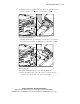
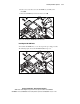
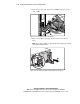
Use a narrow instrument to release each clip from the bezel 1 and 2 by
pushing inward slightly, as shown in the following figure.
5.
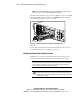
Once each clip is disengaged, remove the switch parts from the bezel,
collecting the two plastic parts and the spring as they disengage from the
bezel. Use care because the tension in the spring may cause it to come
loose.
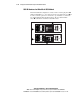
2
1
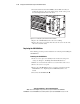
Figure 3-32. Inserting the power switch into the front bezel
6.
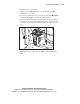
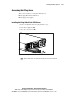
Rotate the switch assembly 180 degrees 1 as shown in the following
figure.