
Compaq ProLiant DL380 Setup and Installation Guide

3-28
Compaq ProLiant DL380 Setup and Installation Guide
Compaq Confidential – Need to Know Required
Writer:
Gilbert Saldivar
Project:
Compaq ProLiant DL380 Setup and Installation Guide
Comments:
Part Number:
120133-002
File Name:
d-ch03 Installing Hardware Options.doc
Last Saved On:
12/10/99 1:11 PM
NOTE:
Because the ProLiant DL380 server features an Integrated Smart Array Controller,
you do not need to connect or configure additional SCSI controllers.
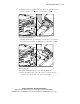
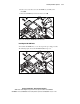
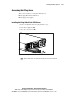
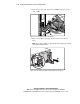
The Wide Ultra2 SCSI drive cage option is now installed in your server. Install
Wide Ultra2 SCSI hard drives in the drive cage 1, 2 and restore data from
your data backup onto the new drives, as needed.
1
2
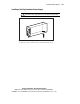
Figure 3-31. Installing the Wide Ultra2 SCSI drive in the Wide Ultra2 SCSI
drive cage
Refer to guides included on the Documentation CD shipped with your server
for additional information on configuring your server.
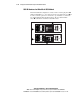
Enabling the Power Switch Security Feature
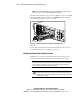
Enabling the power switch security feature allows you to protect the server
from being shut down due to unintentional contact with the power switch.
IMPORTANT:
When the power switch security feature is enabled it protects the server
from being shut down due to unintentional contact with the power switch. In the enabled
mode you must use a slender rod (such as the eraser end of a pencil) to depress the
center circle of the power switch to power on the system.
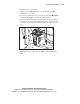
1.
If the server is on, place in Standby mode and remove the power cords.
WARNING:
Moving your server Power On/Standby switch to the Standby
position removes power from most areas of the server; this may take up to 30
seconds. Portions of the power supply and some internal circuitry remain active
until AC power is removed.