
Compaq ProLiant DL380 Setup and Installation Guide

Installing Hardware Options
3-27
Compaq Confidential – Need to Know Required
Writer:
Gilbert Saldivar
Project:
Compaq ProLiant DL380 Setup and Installation Guide
Comments:
Part Number:
120133-002
File Name:
d-ch03 Installing Hardware Options.doc
Last Saved On:
12/10/99 1:11 PM
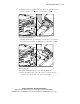
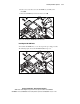
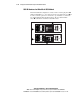
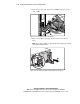
8.
Install the point-to-point SCSI cable, provided in the option kit, between
the 2 x 1-inch drive cage 5 and the 4 x 1-inch drive cage 6.
5
6
Figure 3-29. Installing the point-to-point SCSI cable (provided in the
2 x 1-inch drive cage option kit)
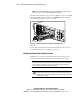
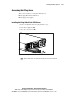
9.
Install the signal cable, provided in the 2 x 1-inch drive cage option kit,
between the 2 x 1-inch drive cage 7 and the 4 x 1-inch drive cage 8.
7
8
Figure 3-30. Installing the signal header cable (provided in the 2 x 1-inch
drive cage option kit)
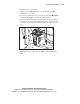
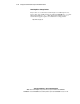
10.
Install the CD-ROM cable to the rear of the CD-ROM drive.
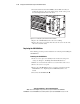
11.
Replace the diskette drive, replace the server access panel, slide and
secure the server into the rack, and connect external cables.