
Compaq ProLiant DL380 Setup and Installation Guide

3-26
Compaq ProLiant DL380 Setup and Installation Guide
Compaq Confidential – Need to Know Required
Writer:
Gilbert Saldivar
Project:
Compaq ProLiant DL380 Setup and Installation Guide
Comments:
Part Number:
120133-002
File Name:
d-ch03 Installing Hardware Options.doc
Last Saved On:
12/10/99 1:11 PM
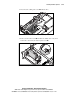
5.
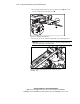
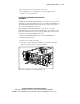
Install the drive cage 1 and secure the cage to the chassis with the
access screws 2.
1
2
Figure 3-27. Securing the 2 x 1-inch Ultra2 SCSI drive cage
6.
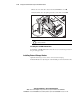
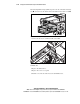
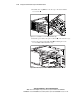
Attach the power cable to the power connector 3 on the new drive cage.
7.
Connect the point-to-point SCSI cable 4 from SCSI port 2 to the
2 x 1-inch Wide Ultra2 SCSI drive cage.
3
4
Figure 3-28. Attaching the power cable and point-to-point SCSI cable