
Compaq ProLiant Clusters for SCO UnixWare 7 U/300 Quick Install Guide for the Compaq ProLiant DL380

Troubleshooting 5-9
Compaq Confidential – Need to Know Required
Writer: Rachel Williams Project: Compaq ProLiant Clusters for SCO UnixWare 7 U/300 Quick Install Guide for the Compaq ProLiant DL380
Comments: Part Number: 221544-001 File Name: f-ch5 Troubleshooting.doc Last Saved On: 12/27/00 11:01 AM
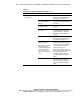
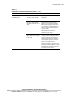
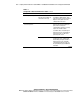
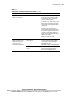
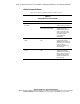
Table 5-3
Solving Node-to-Node Communication Problems
continued
Problem Possible Cause Action
Bad packets or ServerNet I
barrier errors reported
SPA is defective Cluster Membership Service (CLMS)
master (the active root node) is unable
to communicate with a node during
startup or normal operation.
If a node does not join the cluster, verify
that the SPA is functioning on that node
using the SVU as described in Chapter 3
of this guide.
If all nodes have joined the cluster,
verify ServerNet I functionality by using
the ServerNet I graphical monitor or the
ServerNet I command line diagnostic
(spam). See the spam(1M) man page for
additional information.
Replace the SPA if necessary.
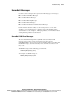
Intermittent ServerNet
Advanced Interface Logic
(SAIL) freeze, link level
self-check errors, or
performance degradation
ServerNet I board installed in
the wrong slot
Install the ServerNet I board into slot 1.
For more information on the certified
server listing see the Compaq High
Availability website at
http://www.compaq.com/highavailability
Defective or uncertified PCI
board
Identify the PCI board that overuses the
PCI bus, hampering SPA operation.
Remove the offending PCI board.