
Compaq ProLiant Clusters for SCO UnixWare 7 U/300 Quick Install Guide for the Compaq ProLiant DL380

5-8 Compaq ProLiant Clusters for SCO UnixWare 7 U/300 Quick Install Guide for the Compaq ProLiant DL380
Compaq Confidential – Need to Know Required
Writer: Rachel Williams Project: Compaq ProLiant Clusters for SCO UnixWare 7 U/300 Quick Install Guide for the Compaq ProLiant DL380
Comments: Part Number: 221544-001 File Name: f-ch5 Troubleshooting.doc Last Saved On: 12/27/00 11:01 AM
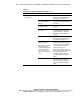
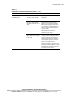
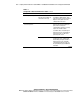
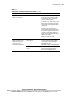
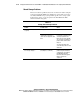
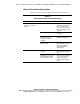
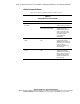
Table 5-3
Solving Node-to-Node Communication Problems
continued
Problem Possible Cause Action
Alternating root node panics ServerNet I cross-cabled in
two-node cluster (and the CI
serial cable is not used)
Power down the cluster. Verify that
ServerNet I is cabled between cluster
nodes (X to X and Y to Y) as described in
Chapter 2 of this guide. Correct the
cabling and boot the cluster.
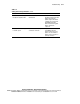
ServerNet I link exception
errors are reported
ServerNet I cable is defective Verify that the ServerNet I cables are
properly connected, do not have bent
pins, and are not crimped or
compromised in any way. If necessary,
replace the ServerNet I cables.
ServerNet I cables can be damaged if
improperly secured or crimped when a
rack-mount server on a slide-rail is
pushed back into a rack.
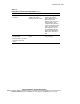
SPA is defective Eliminate the ServerNet I cable as a
possible cause. Then, verify the SPA
functionality by using the ServerNet I
graphical monitor or the ServerNet I
command line diagnostic (spam). See
the spam(1M) man page for additional
information.
continued