
Compaq ProLiant Clusters for SCO UnixWare 7 U/300 Quick Install Guide for the Compaq ProLiant DL380

Troubleshooting 5-3
Compaq Confidential – Need to Know Required
Writer: Rachel Williams Project: Compaq ProLiant Clusters for SCO UnixWare 7 U/300 Quick Install Guide for the Compaq ProLiant DL380
Comments: Part Number: 221544-001 File Name: f-ch5 Troubleshooting.doc Last Saved On: 12/27/00 11:01 AM
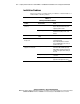
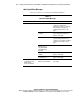
Table 5-1
Solving Installation Problems
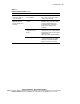
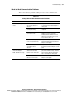
continued
Problem Possible Cause Action
Error messages regarding
the Cluster Integrity (CI)
serial cable display
The CI serial cable is not
properly installed
Install the CI serial cable between
node 1 and node 2 using the serial port
connector B on each node.
Bad connection to the RA4000
controller
Verify that the host bus adapter (HBA),
GBIC-SWs, cables, hubs, and controllers
are properly installed. Refer to the
documentation that comes with the
product for more troubleshooting
information.
Uncertified hardware
configuration (server or
storage)
Verify that the servers and storage
subsystems are on the certified hardware
list for ProLiant clusters. See the certified
hardware listing at
http://www.compaq.com/highavailability
StorageWorks RAID Array
4000 redundant array
controller firmware does
not update
Failed RA4000 controller Verify the functionality of the RA4000
controller as described in the Compaq
Fibre Channel Troubleshooting Guide.
Replace the controller as necessary.