
Compaq ProLiant Clusters for SCO UnixWare 7 U/300 Quick Install Guide for the Compaq ProLiant DL380

Setting Up Cluster Hardware 2-11
Compaq Confidential – Need to Know Required
Writer: Rachel Williams Project: Compaq ProLiant Clusters for SCO UnixWare 7 U/300 Quick Install Guide for the Compaq ProLiant DL380
Comments: Part Number: 221544-001 File Name: c-ch2 Setting Up Hardware.doc Last Saved On: 12/27/00 10:59 AM
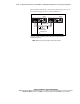
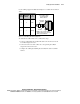
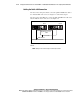
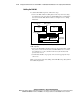
Use the cabling suggestions illustrated in Figure 2-3 to label the ServerNet I
cables.
Node
Identifier
X/Y Fabric
Identifier
Node
Number
1
2
0
1
Pink
Orange
ServerNet I
Switch Port
Number
Cable
Tie
Color
X ServerNet I cables
are identified with
White cable ties.
Red ties are used only during
shipment and are to be removed
during onsite installation.
Figure 2-3. ServerNet I cable labeling suggestion
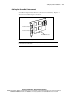
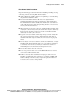
To cable the ServerNet I interconnect, follow these steps:
1. Connect a white-labeled ServerNet I X cable to the X connection on the
ServerNet I adapter in node 1.
2. Connect the other end of the cable to the corresponding ServerNet I
adapter X connection in node 2.
3. Complete the cabling by installing the ServerNet I Y cable in a similar
manner.