
Compaq ProLiant Clusters for SCO UnixWare 7 U/300 Quick Install Guide for the Compaq ProLiant DL380

Clustering Overview 1-5
Compaq Confidential – Need to Know Required
Writer: Rachel Williams Project: Compaq ProLiant Clusters for SCO UnixWare 7 U/300 Quick Install Guide for the Compaq ProLiant DL380
Comments: Part Number: 221544-001 File Name: b-ch1 Clustering Overview.doc Last Saved On: 12/27/00 10:58 AM
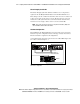
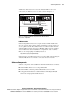
An Ethernet cluster interconnect uses the embedded NIC in each server
connected by one Ethernet crossover cable as shown in Figure 1-2.
Node 1 Node 2
CI Serial Cable
Dedicated
ServerNet I Cables
RA4100
Figure 1-2. Example of hardware components of the Ethernet cluster
interconnect configuration
LAN Connection
Clusters using Ethernet interconnect require an NC3123 NIC installed into
slot 1 of each node before cluster software installation so that the cluster can
access a public network. These NICs must be on a different subnet from the
embedded Ethernet cluster interconnect. Multiple public network controllers
can be installed after cluster installation is complete. For a list of certified
NICs, see the Compaq High Availability website at
http://www.compaq.com/highavailability
Clusters that use ServerNet I interconnect access the public network using the
embedded NIC. Each server must be connected to the same network.
Software Components
Software components of the U/300 kit for the ProLiant DL380 server include:
■ SCO UnixWare Release 7.1.1 Compact Media Kit
■ SCO UnixWare 7 NonStop Clusters Media Kit Version 7.1.1+IP
■ Compaq ProLiant Clusters for SCO UnixWare 7 DL380 Quick Install
CDs for the Compaq ProLiant DL380 server