
HP ProLiant DL380 G6 Server User Guide
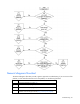
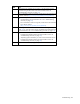
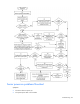
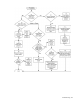
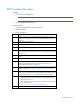
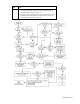
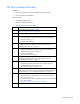
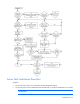
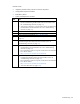
Table Of Contents
- HP ProLiant DL380 G6 Server User Guide
- Abstract
- Notice
- Contents
- Component identification
- Front panel components
- Front panel LEDs and buttons
- Systems Insight Display LEDs
- Systems Insight Display LED combinations
- Rear panel components
- Rear panel LEDs and buttons
- Non-hot-plug PCI riser board slot definitions
- System board components
- SAS and SATA device numbers
- SAS and SATA hard drive LEDs
- SAS and SATA hard drive LED combinations
- PCI riser cage LEDs
- Battery pack LEDs
- Hot-plug fans
- Operations
- Setup
- Hardware options installation
- Introduction
- Processor option
- Memory options
- Hot-plug SAS hard drive options
- Optical drive option
- Redundant hot-plug power supply option
- Expansion board options
- PCI riser board option
- Hard drive cage option
- HP Trusted Platform Module option
- Cabling
- Configuration and utilities
- Troubleshooting
- Battery replacement
- Regulatory compliance notices
- Regulatory compliance identification numbers
- Federal Communications Commission notice
- Declaration of conformity for products marked with the FCC logo, United States only
- Modifications
- Cables
- Canadian notice (Avis Canadien)
- European Union regulatory notice
- Disposal of waste equipment by users in private households in the European Union
- Japanese notice
- BSMI notice
- Korean notice
- Chinese notice
- Laser compliance
- Battery replacement notice
- Taiwan battery recycling notice
- Power cord statement for Japan
- Electrostatic discharge
- Specifications
- Technical support
- Acronyms and abbreviations
- Index

Troubleshooting 90
Possible causes:
• Improperly seated or faulty internal or external component
• Unsupported component installed
• Redundancy failure
• System overtemperature condition
Item See
1
•
"Integrated Management Log (on page 72)" or in the HP ProLiant
Servers Troubleshooting Guide located on the Documentation CD or
see "Troubleshooting resources (on page 75)"
•
"Event list error messages" in the HP ProLiant Servers Troubleshooting
Guide located on the Documentation CD or see "Troubleshooting
resources (on page 75)"
2
"Component identification (on page 7)"
3
"Server health LEDs (on page 80)"
4
System Management Homepage (https://localhost:2381)
5
"Power-on problems flowchart ("Server power-on problems flowchart" on
page 83)"
6
"HP Insight Diagnostics (on page 72)" or in the HP ProLiant Servers
Troubleshooting Guide located on the Documentation CD or see
"Troubleshooting resources (on page 75)"
7
•
"Hardware problems" in the HP ProLiant Servers Troubleshooting
Guide located on the Documentation CD or see "Troubleshooting
resources (on page 75)"
•
Server maintenance and service guide, located on the Documentation
CD or the HP website
(http://www.hp.com/products/servers/platforms)
8
•
"Smart Array SCSI Diagnosis feature" or in the HP ProLiant Servers
Troubleshooting Guide located on the Documentation CD or see
"Troubleshooting resources (on page 75)"
•
Server maintenance and service guide, located on the Documentation
CD or the HP website
(http://www.hp.com/products/servers/platforms)
•
"HP contact information (on page 104)"