
HP ProLiant DL380 G6 Server User Guide
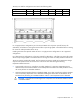
Table Of Contents
- HP ProLiant DL380 G6 Server User Guide
- Abstract
- Notice
- Contents
- Component identification
- Front panel components
- Front panel LEDs and buttons
- Systems Insight Display LEDs
- Systems Insight Display LED combinations
- Rear panel components
- Rear panel LEDs and buttons
- Non-hot-plug PCI riser board slot definitions
- System board components
- SAS and SATA device numbers
- SAS and SATA hard drive LEDs
- SAS and SATA hard drive LED combinations
- PCI riser cage LEDs
- Battery pack LEDs
- Hot-plug fans
- Operations
- Setup
- Hardware options installation
- Introduction
- Processor option
- Memory options
- Hot-plug SAS hard drive options
- Optical drive option
- Redundant hot-plug power supply option
- Expansion board options
- PCI riser board option
- Hard drive cage option
- HP Trusted Platform Module option
- Cabling
- Configuration and utilities
- Troubleshooting
- Battery replacement
- Regulatory compliance notices
- Regulatory compliance identification numbers
- Federal Communications Commission notice
- Declaration of conformity for products marked with the FCC logo, United States only
- Modifications
- Cables
- Canadian notice (Avis Canadien)
- European Union regulatory notice
- Disposal of waste equipment by users in private households in the European Union
- Japanese notice
- BSMI notice
- Korean notice
- Chinese notice
- Laser compliance
- Battery replacement notice
- Taiwan battery recycling notice
- Power cord statement for Japan
- Electrostatic discharge
- Specifications
- Technical support
- Acronyms and abbreviations
- Index
Component identification 21
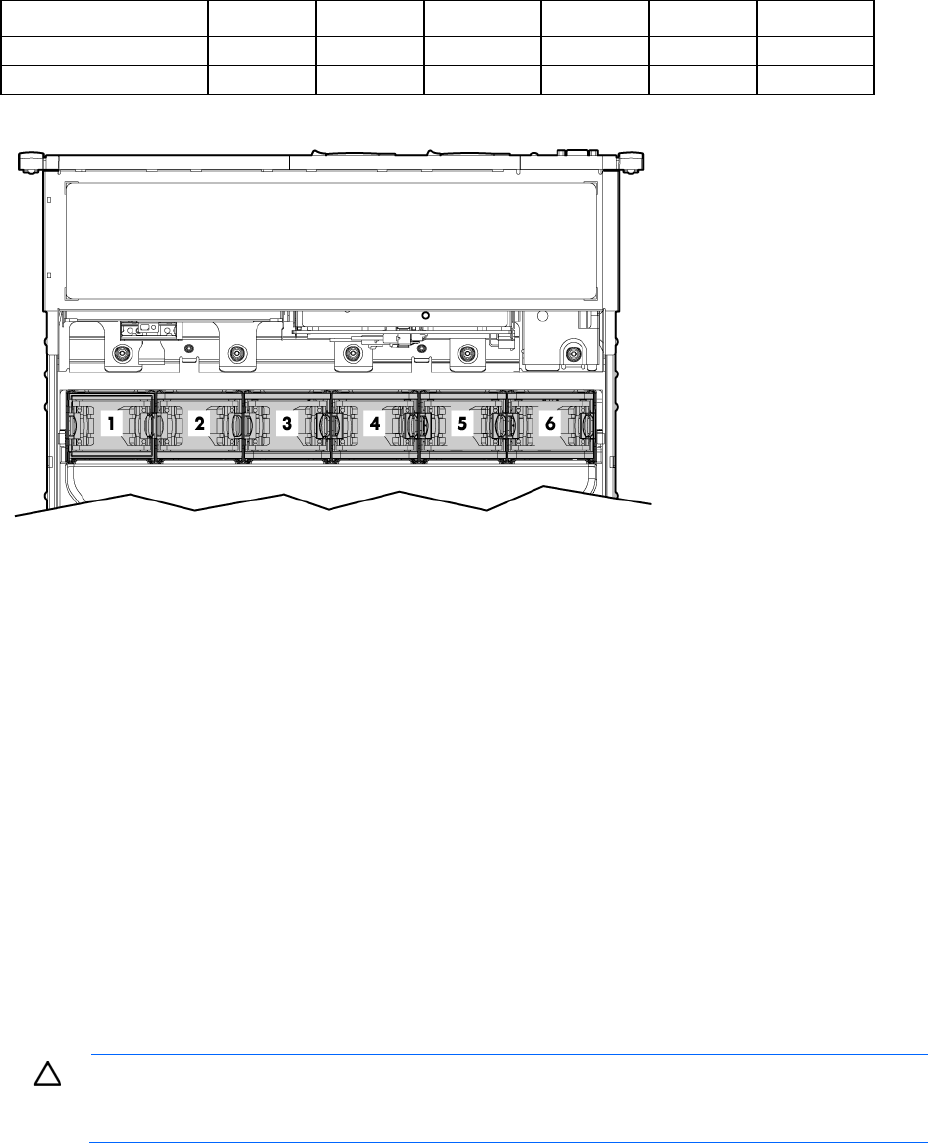
The only two valid fan configurations are listed in the following table.
Configuration Fan bay 1 Fan bay 2 Fan bay 3 Fan bay 4 Fan bay 5 Fan bay 6
1 processor
Fan Fan Fan Fan Fan blank Fan blank
2 processors
Fan Fan Fan Fan Fan Fan
For a single-processor configuration, four fans and two blanks are required in specific fan bays for
redundancy. A fan failure or missing fan causes all fans to spin at high speed. A second fan failure or missing
fan causes an orderly shutdown of the server.
Installing more than the required number of fans in a single-processor configuration is not a supported
configuration.
For a dual-processor configuration, six fans are required for redundancy. A fan failure or missing fan causes
all fans to spin at high speed. A second fan failure or missing fan causes an orderly shutdown of the server.
The server supports variable fan speeds. The fans operate at minimum speed until a temperature change
requires a fan speed increase to cool the server. The server shuts down during the following
temperature-related scenarios:
• At POST and in the OS, iLO 2 performs an orderly shutdown if a cautionary temperature level is
detected. If the server hardware detects a critical temperature level before an orderly shutdown occurs,
the server performs an immediate shutdown.
• When the Thermal Shutdown feature is disabled in RBSU, iLO 2 does not perform an orderly shutdown
when a cautionary temperature level is detected. Disabling this feature does not disable the server
hardware from performing an immediate shutdown when a critical temperature level is detected.
CAUTION: A thermal event can damage server components when the Thermal Shutdown feature
is disabled in RBSU.