
Microsoft®Windows® Small Business Server 2008 Getting Started



Quick links and help 8
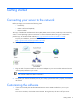
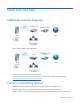
Switch—Provides additional network connection points for computers and other devices.
Some devices might be multipurpose, such as a router with firewall capabilities. Check your device
manufacturer documentation for more information.
Microsoft Windows Small Business Server 2008
Premium Edition
Microsoft® Windows® Small Business Server 2008 Premium Edition includes a second server that is
based on Windows® Server 2008 technologies and on Microsoft® SQL Server™ 2008. The product key
for each of these is provided with each DVD.
Existing server migration
If you already have a Windows® domain, you can migrate the information on your existing server to the
new server.
IMPORTANT: You must collect specific information before you can migrate to the new server.
For more information about migration, see the Microsoft® website
(http://go.microsoft.com/fwlink/?LinkID=106133
).
Where to get help
On your server
If you have questions while you are installing your new server, completing tasks in the console, or using
the productivity tools for the network, click the Help links that appear on many pages.
On the Internet
Technical articles (http://go.microsoft.com/fwlink/?LinkID=104574
)
Help on the Internet (http://go.microsoft.com/fwlink/?LinkID=104575
)
In the Community
News group forum (http://go.microsoft.com/fwlink/?LinkID=104576
)
Community resources (http://go.microsoft.com/fwlink/?LinkID=104577
)
Requirements for client access licenses
Each user or computer that accesses your network must have a CAL for Windows® Small Business Server
2008. Your server software includes five CALs. For more information about purchasing CALs for
Windows® Small Business Server 2008, see the Licensing web page
(http://go.microsoft.com/fwlink/?LinkID=106133
).