
HP ProLiant DL380 Generation 5 Server User Guide

Hardware options installation 48
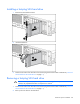
Installing a hot-plug SAS hard drive
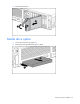
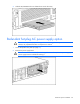
1. Remove the SAS hard drive blank.
2. Install the hard drive.
3. Determine the status of the hard drive from the hot-plug SAS hard drive LED combinations ("SAS and
SATA hard drive LED combinations" on page 17).
Removing a hot-plug SAS hard drive
CAUTION: To prevent improper cooling and thermal damage, do not operate the server unless
all bays are populated with either a component or a blank.
1. Determine the status of the hard drive from the hot-plug SAS hard drive LED combinations ("SAS and
SATA hard drive LED combinations" on page 17).
2. Back up all server data on the hard drive.