
HP ProLiant DL380 Generation 5 Server Maintenance and Service Guide

Removal and replacement procedures 67
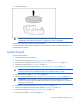
5.
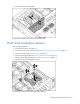
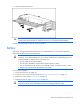
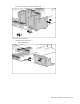
Remove the battery.
IMPORTANT: Replacing the system board battery resets the system ROM to its default
configuration. After replacing the battery, reconfigure the system through RBSU.
To replace the component, reverse the removal procedure.
For more information about battery replacement or proper disposal, contact an authorized reseller or an
authorized service provider.
System board
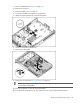
To remove the component:
1. Power down the server (on page 30).
2. Remove all power supplies ("Hot-plug power supply" on page 34).
3. Extend or remove the server from the rack ("Remove the server from the rack" on page 31).
4. Remove the access panel ("Access panel" on page 32).
5. Remove the power supply cage assembly ("Power supply cage assembly" on page 41).
CAUTION: To prevent damage to the server or expansion boards, power down the server
and remove all AC power cords before removing or installing the PCI riser cage.
6. Remove the PCI riser cage ("PCI riser cage" on page 62).
7. Remove expansion boards from slots 1 and 2 ("Expansion board (slots 1 and 2)" on page 64).
IMPORTANT: For this procedure, you do not need to remove the hot-plug fans from the
processor fan bracket. When reinstalling the processor fan bracket, press the top of each fan
to be sure it seats securely.
8. Remove the processor fan bracket ("Processor fan bracket" on page 39).
9. Remove the hot-plug fans from the I/O fan bracket ("Hot-plug fan" on page 38).
10. Remove the battery pack ("Removing the battery pack" on page 54).
11. Remove the air baffle ("Air baffle" on page 55).