
HP ProLiant DL380 Generation 5 Server Maintenance and Service Guide

Removal and replacement procedures 62
PCI riser cage
To remove the component:
CAUTION: To prevent damage to the server or expansion boards, power down the server
and remove all AC power cords before removing or installing the PCI riser cage.
1. Power down the server (on page 30).
2. Extend the server from the rack (on page 29).
3. Remove the access panel ("Access panel" on page 32).
4. Disconnect any internal or external cables connected to any existing expansion boards.
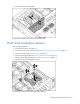
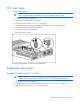
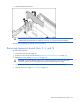
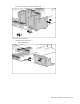
5. Press the blue button to release the black knob.
6. Turn the black knob counter-clockwise.
7. Remove the PCI riser cage.
To replace the component, reverse the removal procedure.
Expansion slot covers
Expansion slot covers (1 and 2)
CAUTION: To prevent improper cooling and thermal damage, do not operate the server
unless all PCI slots have either an expansion slot cover or an expansion board installed.
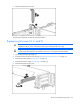
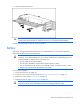
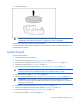
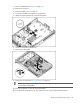
1. Power down the server (on page 30).
2. Extend or remove the server from the rack ("Remove the server from the rack" on page 31).
3. Remove the access panel ("Access panel" on page 32).