
HP ProLiant DL380 Generation 5 Server Maintenance and Service Guide

Removal and replacement procedures 60
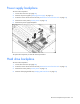
Power supply backplane
To remove the component:
1. Power down the server (on page 30).
2. Remove all power supplies ("Hot-plug power supply" on page 34).
3. Extend or remove the server from the rack ("Remove the server from the rack" on page 31).
4. Remove the access panel ("Access panel" on page 32).
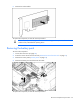
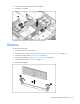
5. Remove the power supply backplane.
To replace the component, reverse the removal procedure.
Hard drive backplane
To remove the component:
1. Power down the server (on page 30).
2. Extend or remove the server from the rack ("Remove the server from the rack" on page 31).
3. Remove the access panel ("Access panel" on page 32).
4. Remove all hot-plug hard drives ("Hot-plug SAS hard drive" on page 33).