
Compaq ProLiant DL380 Generation 2 Setup and Installation Guide

4-18 Compaq ProLiant DL380 Generation 2 Server Setup and Installation Guide
Compaq Confidential – Need to Know Required
Writer: Rob Weaver Project: Compaq ProLiant DL380 Generation 2 Server Setup and Installation Guide Comments:
Part Number: 203844-001 File Name: e-ch4 Installing the Server.doc Last Saved On: 3/27/01 1:33 PM
Powering Up the Server
After the cables have been connected to the server, you are ready to power up
the server.
To power up the server:
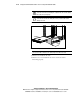
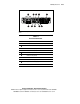
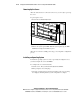
1. Press the Power On/Standby button.
Figure 4-16. Powering up the server
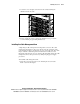
2. Observe the system power LED. When the system powers up, the LED
illumination changes from amber to green.
After the server has successfully powered up, you can begin the configuration
process.
Installing an Operating System
To install an operating system on a new or previously unconfigured server,
you must configure the server with RBSU.
To configure the server for the first time:
1. Start the server. The system automatically launches RBSU.
2. When prompted, select a language.
3. Select the operating system you want to install on your server. A dialog
box displays, indicating that the system configuration is complete.