
Compaq ProLiant DL380 Generation 2 Setup and Installation Guide

4-14 Compaq ProLiant DL380 Generation 2 Server Setup and Installation Guide
Compaq Confidential – Need to Know Required
Writer: Rob Weaver Project: Compaq ProLiant DL380 Generation 2 Server Setup and Installation Guide Comments:
Part Number: 203844-001 File Name: e-ch4 Installing the Server.doc Last Saved On: 3/27/01 1:33 PM
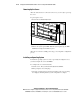
Connecting the Power Cord and Peripheral Devices
After the server has been installed in the rack, connect the power cord and
peripheral devices to the connectors located on the rear panel of the server.
Icons on the back of the server identify the function of each connector.
WARNING: To reduce the risk of electrical shock or fire, do not plug
telecommunications/telephone connectors into the NIC connectors.
CAUTION: If the Remote Insight Lights-Out Edition board is installed in your
server, ensure that you connect your video cable in the video connector on the
rear of the Remote Insight Lights-Out Edition board. The standard video
connector on the server rear panel is not used when the Remote Insight Lights-
Out Edition board is installed. For more information, see Chapter 5, “Remote
Insight Lights-Out Edition (Optional).”
IMPORTANT: Compaq SmartStart for Servers Windows 95, does not support a USB
mouse. During the SmartStart process, you must use a legacy PS/2 mouse. For more
information about USB support, see the “ROM Legacy USB Support” section in Chapter 7,
“Server Configuration and Utilities.”
Identifying Rear Panel Connectors
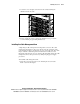
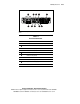
Use the following figure and table to identify connectors, and follow the
connection order to attach your cables and power cord. The location numbers
in the figure correspond to the connection order for the peripheral cables and
power cord.