
Compaq ProLiant DL380 Generation 2 Setup and Installation Guide


Installing the Server 4-9
Compaq Confidential – Need to Know Required
Writer: Rob Weaver Project: Compaq ProLiant DL380 Generation 2 Server Setup and Installation Guide Comments:
Part Number: 203844-001 File Name: e-ch4 Installing the Server.doc Last Saved On: 3/27/01 1:33 PM
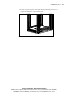
To insert the server into the rack and secure it with the front panel
thumbscrews:
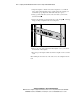
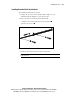
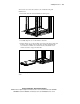
1. Extend the slide rails forward until they lock into place.
Figure 4-8. Extending the slide rails
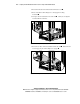
2. Carefully align the server rails with the slide rails.
3. Ensure that the server rails are fully engaged into the plastic guides and
bearings of the sliding rails on both sides, and then slowly slide the
server into the rack. The server slides into the rack until the server
rail-release latches engage the slide rails.
Figure 4-9. Aligning the server rails with the slide rails and inserting the
server