
Compaq ProLiant DL380 Generation 2 Setup and Installation Guide


4-8 Compaq ProLiant DL380 Generation 2 Server Setup and Installation Guide
Compaq Confidential – Need to Know Required
Writer: Rob Weaver Project: Compaq ProLiant DL380 Generation 2 Server Setup and Installation Guide Comments:
Part Number: 203844-001 File Name: e-ch4 Installing the Server.doc Last Saved On: 3/27/01 1:33 PM
Installing the Server Rails on the Chassis
Before you can load the server into the rack, you must install the server rails
on the chassis.
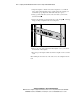
To install the server rails:
1. Place the server on a flat, level surface.
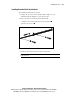
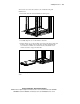
2. Place the keyholes of the right server rail over the pins on the side of the
server
.
3. Slide the server rail toward the rear of the server until it locks into
place
. When the server rail is fully seated, it extends past the rear of
the server.
1
2
Figure 4-7. Installing the right server rail
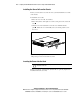
4. Repeat steps 2 and 3 for the left server rail.
Inserting the Server into the Rack
CAUTION: To avoid destabilizing the rack, install multiple servers starting from
the bottom of the rack.
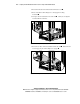
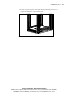
Before you continue, ensure that the standard rails are perfectly aligned and
installed and that the server fits.