
Compaq ProLiant DL380 Generation 2 Setup and Installation Guide


4-4 Compaq ProLiant DL380 Generation 2 Server Setup and Installation Guide
Compaq Confidential – Need to Know Required
Writer: Rob Weaver Project: Compaq ProLiant DL380 Generation 2 Server Setup and Installation Guide Comments:
Part Number: 203844-001 File Name: e-ch4 Installing the Server.doc Last Saved On: 3/27/01 1:33 PM
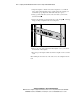
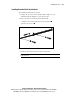
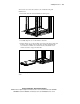
3. Align the template so that the sides of the template are even with the
sides of the rack. Tick marks on the vertical rails of the rack help you
maintain the proper alignment. Tick marks indicate U-spaces.
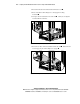
4. Using a pencil, mark the locations on the rack where you insert the
standard rail tabs
.
5. On the rack, mark the top and bottom edges of the template . This step
helps you align a template for the next component.
1
2
1
2
Figure 4-2. Marking the rack for server installation
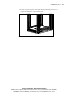
6. Move to the rear of the rack and turn the template over so you can use
the back side of the template.
7. Repeat steps 2 through 5 with the back of the template on the rear of the
rack.
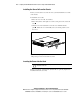
After marking the front and rear of the rack, remove the template from the
rack.