
Compaq ProLiant DL380 Generation 2 Setup and Installation Guide



3-44 Compaq ProLiant DL380 Generation 2 Server Setup and Installation Guide
Compaq Confidential – Need to Know Required
Writer: Rob Weaver Project: Compaq ProLiant DL380 Generation 2 Server Setup and Installation Guide Comments:
Part Number: 203844-001 File Name: d-ch3 Installing Hardware Options.doc Last Saved On: 4/5/01 1:55 PM
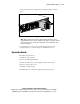
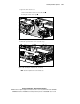
9. Install the PCI riser cage:
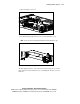
a. Align the PCI riser cage with the chassis.
b. Insert the PCI riser cage. Ensure the PCI riser cage seats firmly in
the connector on the system board.
Figure 3-43. Installing the PCI riser cage
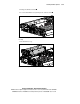
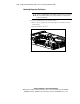
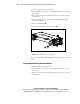
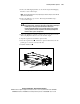
c. Tighten the thumbscrews .
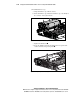
d. Lower the thumbscrew knobs by turning them one-quarter turn
counter-clockwise and pressing down
.
1
2
2
1
Figure 3-44. Tightening the PCI riser cage thumbscrews