
Compaq ProLiant DL380 Generation 2 Setup and Installation Guide



Installing Hardware Options 3-43
Compaq Confidential – Need to Know Required
Writer: Rob Weaver Project: Compaq ProLiant DL380 Generation 2 Server Setup and Installation Guide Comments:
Part Number: 203844-001 File Name: d-ch3 Installing Hardware Options.doc Last Saved On: 4/5/01 1:55 PM
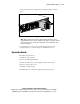
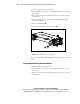
3. Remove the PCI shipping bracket. See the “Removing the PCI Shipping
Bracket” section in this chapter.
NOTE: The PCI shipping bracket is only required if you intend to ship the server with PCI
expansion boards installed.
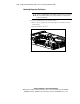
4. Remove the PCI riser cage. See the “Removing the PCI Riser Cage”
section in this chapter.
CAUTION: To avoid the risk of damage to your system or
expansion boards, remove all AC power cords before installing or
removing non-hot-plug expansion boards. Moving the
Power On/Standby button to the standby position still provides
auxiliary power to the PCI expansion slot and may damage the
board or other system components.
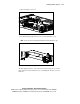
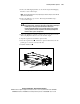
5. Remove the thumbscrew and the expansion slot cover for slot 1. See the
“Removing Expansion Slot Covers” section in this chapter.
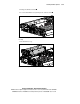
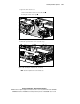
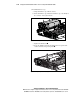
6. Align the expansion board with the expansion slot.
7. Insert the expansion board . Ensure the expansion board slides into the
guiding groove and seats securely in the slot.
8. Install the thumbscrew .
1
2
Figure 3-42. Installing an expansion board