
Compaq ProLiant DL380 Generation 2 Setup and Installation Guide



3-36 Compaq ProLiant DL380 Generation 2 Server Setup and Installation Guide
Compaq Confidential – Need to Know Required
Writer: Rob Weaver Project: Compaq ProLiant DL380 Generation 2 Server Setup and Installation Guide Comments:
Part Number: 203844-001 File Name: d-ch3 Installing Hardware Options.doc Last Saved On: 4/5/01 1:55 PM
Identifying the Expansion Slots
Use Figure 3-33 and Table 3-5 to identify the ProLiant DL380 Generation 2
server expansion slots.
1 2 3
3
2
Figure 3-33. Identifying expansion slots (rear view)
Table 3-5
Expansion Slots
Item Description
Slot 1 – 64-bit/33-MHz 5V
Slot 2 – 64-bit/66-MHz 3.3 V hot-plug capable
Slot 3 – 64-bit/66-MHz 3.3 V hot-plug capable
Removing the PCI Shipping Bracket
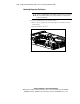
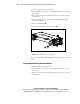
Every ProLiant DL380 Generation 2 server ships with a PCI shipping bracket
that helps ensure PCI expansion boards do not unseat from connectors during
shipping. Before installing a PCI expansion board, you must remove the PCI
shipping bracket.
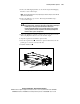
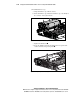
To remove the PCI shipping bracket:
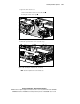
1. Remove the access panel. See the “Removing the Access Panel” section
in this chapter.