
Compaq ProLiant DL380 Generation 2 Setup and Installation Guide



Installing Hardware Options 3-35
Compaq Confidential – Need to Know Required
Writer: Rob Weaver Project: Compaq ProLiant DL380 Generation 2 Server Setup and Installation Guide Comments:
Part Number: 203844-001 File Name: d-ch3 Installing Hardware Options.doc Last Saved On: 4/5/01 1:55 PM
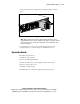
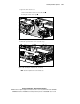
3. Slide the redundant power supply into the empty bay until it locks into
place.
Figure 3-32. Installing a redundant hot-plug power supply
NOTE: When performing a hot-plug power supply installation, verify that the power
supply LED illuminates green, after you install the power supply. For information about the
power supply LED, see the “Hot-Plug Power Supply LED” section in Appendix E, “LED
Indicators and Switches.”
4. Connect the power cord. See the “Connecting the Power Cord and
Peripheral Devices” section in Chapter 4, “Installing the Server.”
Expansion Boards
To install an expansion board:
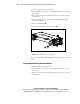
1. Identify the expansion slots.
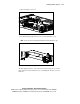
2. Remove the PCI shipping bracket.
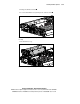
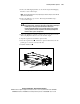
3. Remove the PCI riser cage (non-hot-plug expansion boards only).
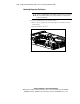
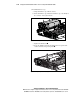
4. Remove expansion slot covers.
5. Install the expansion board.
6. Install the PCI riser cage (non-hot-plug expansion boards only).