
Compaq ProLiant DL380 Generation 2 Setup and Installation Guide



3-34 Compaq ProLiant DL380 Generation 2 Server Setup and Installation Guide
Compaq Confidential – Need to Know Required
Writer: Rob Weaver Project: Compaq ProLiant DL380 Generation 2 Server Setup and Installation Guide Comments:
Part Number: 203844-001 File Name: d-ch3 Installing Hardware Options.doc Last Saved On: 4/5/01 1:55 PM
To install a redundant hot-plug power supply:
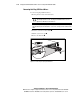
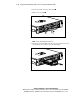
1. Remove the power supply blank:
a. Press the locking lever .
b. Pull the blank out of the bay .
1
2
Figure 3-30. Removing a power supply blank
NOTE: Store the power supply blank for future use.
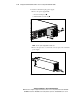
2. Remove the protective cover from the connector pins on the redundant
power supply.
Figure 3-31. Removing protective cover from power supply connector pins