
Compaq ProLiant DL380 Generation 2 Setup and Installation Guide



Installing Hardware Options 3-33
Compaq Confidential – Need to Know Required
Writer: Rob Weaver Project: Compaq ProLiant DL380 Generation 2 Server Setup and Installation Guide Comments:
Part Number: 203844-001 File Name: d-ch3 Installing Hardware Options.doc Last Saved On: 4/5/01 1:55 PM
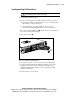
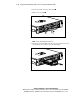
2. Install the redundant hot-plug fan. Ensure the fan seats firmly into the
connector on the system board.
Figure 3-29. Installing a hot-plug fan
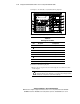
NOTE: When performing a hot-plug fan installation, verify that the fan LED illuminates
green, after you install the fan. For information about the fan LED, see the “Hot-Plug Fan
LEDs” section in Appendix E, “LED Indicators and Switches.”
3. Install the access panel. See the “Installing the Access Panel” section in
this chapter.
Installing a Redundant Hot-Plug Power Supply
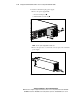
The ProLiant DL380 Generation 2 server supports a redundant hot-plug power
supply to provide power to the system in the event that the primary power
supply fails.