
Compaq ProLiant DL380 Generation 2 Setup and Installation Guide



3-30 Compaq ProLiant DL380 Generation 2 Server Setup and Installation Guide
Compaq Confidential – Need to Know Required
Writer: Rob Weaver Project: Compaq ProLiant DL380 Generation 2 Server Setup and Installation Guide Comments:
Part Number: 203844-001 File Name: d-ch3 Installing Hardware Options.doc Last Saved On: 4/5/01 1:55 PM
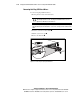
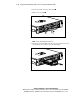
2. Squeeze the middle of the tape drive blank .
3. Pull to remove the blank .
2
1
Figure 3-26. Removing the tape drive blank
NOTE: Store the tape drive blank for future use.
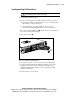
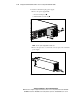
4. Slide the Universal Hot-Plug Tape drive into the bay. Ensure the drive
seats firmly into the connector on the SCSI backplane.
Figure 3-27. Installing the Universal Hot-Plug Tape drive