
Compaq ProLiant DL380 Generation 2 Setup and Installation Guide



Installing Hardware Options 3-29
Compaq Confidential – Need to Know Required
Writer: Rob Weaver Project: Compaq ProLiant DL380 Generation 2 Server Setup and Installation Guide Comments:
Part Number: 203844-001 File Name: d-ch3 Installing Hardware Options.doc Last Saved On: 4/5/01 1:55 PM
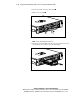
To install the CD blank, slide the blank into the CD MultiBay until it locks
into place.
Figure 3-25. Installing the CD blank
Installing a Compaq Universal Hot-Plug Tape Drive
The ProLiant DL380 Generation 2 server supports the Compaq Universal
Hot-Plug Tape drive (AIT and DDS-4 types) for data storage and backup.
When the drive is installed, only five of the six hard drive bays may be
populated with SCSI hard drives.
To install a Universal Hot-Plug Tape drive:
1. Remove the hot-plug SCSI hard drive or blank in the uppermost left bay
(SCSI ID 5):
G If a hard drive blank is installed, see the “Removing Hard Drive
Blanks” section in this chapter.
G If a hot-plug SCSI hard drive is installed, see the “Removing
Hot-Plug SCSI Hard Drives” section in this chapter.