
Compaq ProLiant DL380 Generation 2 Setup and Installation Guide



3-28 Compaq ProLiant DL380 Generation 2 Server Setup and Installation Guide
Compaq Confidential – Need to Know Required
Writer: Rob Weaver Project: Compaq ProLiant DL380 Generation 2 Server Setup and Installation Guide Comments:
Part Number: 203844-001 File Name: d-ch3 Installing Hardware Options.doc Last Saved On: 4/5/01 1:55 PM
Removing the CD-ROM Drive
ProLiant DL380 Generation 2 servers ship standard with a thin-profile
IDE CD-ROM drive in the CD MultiBay. You can remove the CD-ROM drive
for security purposes.
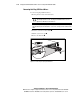
To remove the CD-ROM drive:
1. Power down the server. See the “Powering Down the Server” section in
this chapter.
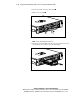
2. Press the ejection button .
3. Pull the CD-ROM drive out of the CD MultiBay .
2
1
Figure 3-24. Ejecting and removing the CD-ROM drive from the CD MultiBay
Installing the CD Blank
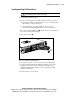
ProLiant DL380 Generation 2 servers ship standard with a CD-ROM drive
installed in the CD MultiBay. A CD blank also ships standard with the server.
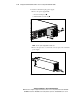
If you remove the CD-ROM drive, install the CD blank before powering up
the server.
CAUTION: Always populate the CD MultiBay with either a CD-ROM drive or CD
blank. Proper airflow can only be maintained when the CD MultiBay is
populated. Unpopulated bays can lead to improper cooling and thermal damage.