
Compaq ProLiant DL380 Generation 2 Setup and Installation Guide



Installing Hardware Options 3-25
Compaq Confidential – Need to Know Required
Writer: Rob Weaver Project: Compaq ProLiant DL380 Generation 2 Server Setup and Installation Guide Comments:
Part Number: 203844-001 File Name: d-ch3 Installing Hardware Options.doc Last Saved On: 4/5/01 1:55 PM
SCSI ID Numbers
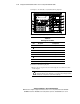
The ProLiant DL380 Generation 2 standard configuration consists of three
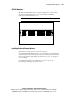
2×1-inch hot-plug SCSI hard drive cages with numbered SCSI IDs:
0 through 5, indicated in Figure 3-21.
IMPORTANT: Always populate hard drive bays starting with the lowest SCSI ID.
4
5
2
3
0
1
Figure 3-21. SCSI ID numbers
Installing External Storage Devices
Optional mass storage devices can be connected to the
Compaq ProLiant DL380 Generation 2 server through the external SCSI port
on the back of the unit or through optional array controller expansion boards.
For more information about cabling external storage devices, see Chapter 6,
“Server Cabling.”
For additional information on configuring your server, refer to the
Documentation CD shipped with your server.