
Compaq ProLiant DL380 Generation 2 Setup and Installation Guide




3-24 Compaq ProLiant DL380 Generation 2 Server Setup and Installation Guide
Compaq Confidential – Need to Know Required
Writer: Rob Weaver Project: Compaq ProLiant DL380 Generation 2 Server Setup and Installation Guide Comments:
Part Number: 203844-001 File Name: d-ch3 Installing Hardware Options.doc Last Saved On: 4/5/01 1:55 PM
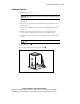
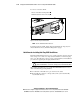
To remove a hard drive blank:
1. Press and hold the locking button .
2. Pull the blank out of the drive bay .
2
1
Figure 3-20. Removing a hard drive blank
NOTE: Store the hard drive blank for future use.
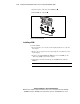
To install a hard drive blank, simply align the blank with the empty bay and
slide the blank into the bay until the locking button engages.
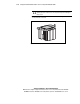
Guidelines for Installing Hot-Plug SCSI Hard Drives
The ProLiant DL380 Generation 2 server contains eight drive bays for internal
mass storage devices. The server ships standard with three 2×1-inch hot-plug
drive cages. The following sections provide general guidelines and installation
procedures for upgrading the hot-plug SCSI hard drives.
CAUTION: Before removing a hard drive, read the “Hot-Plug Hard Drive
Replacement Guidelines” section in the Compaq Servers Troubleshooting Guide.
When adding SCSI hard drives to your ProLiant DL380 Generation 2 server,
observe the following general guidelines:
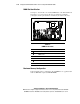
■ A maximum of 14 SCSI devices per channel can be added.
■ Each SCSI drive must have a unique address. The system automatically
sets all SCSI addresses.