
Compaq ProLiant DL380 Generation 2 Setup and Installation Guide




Installing Hardware Options 3-23
Compaq Confidential – Need to Know Required
Writer: Rob Weaver Project: Compaq ProLiant DL380 Generation 2 Server Setup and Installation Guide Comments:
Part Number: 203844-001 File Name: d-ch3 Installing Hardware Options.doc Last Saved On: 4/5/01 1:55 PM
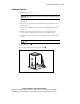
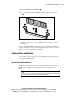
6. Insert the DIMM into the DIMM slot .
7. Press down firmly. When the DIMM seats fully in the slot, the latches
close
.
2
2
1
Figure 3-19. Installing a DIMM
8. Install the access panel. See the “Installing the Access Panel” section in
this chapter.
If you are installing DIMMs for the online spare configuration, use RBSU to
configure this feature. See the “Configuring Online Spare Memory” section in
Chapter 7, “Server Configuration and Utilities.”
System Drives and Blanks
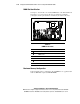
The following section explains removal and installation of hard drive blanks
and hot-plug SCSI hard drives.
Removing Hard Drive Blanks
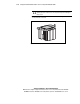
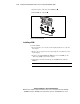
The ProLiant DL380 Generation 2 server ships standard with six hard drive
blanks. Before installing a hot-plug SCSI hard drive, you must remove a
blank.
CAUTION: Always populate drive bays with either a hard drive or blank. Proper
airflow can only be maintained when the bays are populated. Unpopulated drive
bays can lead to improper cooling and thermal damage.