
Compaq ProLiant DL380 Generation 2 Setup and Installation Guide




Installing Hardware Options 3-21
Compaq Confidential – Need to Know Required
Writer: Rob Weaver Project: Compaq ProLiant DL380 Generation 2 Server Setup and Installation Guide Comments:
Part Number: 203844-001 File Name: d-ch3 Installing Hardware Options.doc Last Saved On: 4/5/01 1:55 PM
Online Spare Memory Configuration
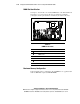
In the online spare mode, banks A and B provide standard memory functions,
while bank C is configured for redundancy. DIMMs installed in bank C must
be of equal or greater capacity than the largest pair of DIMMs installed in
banks A or B.
If any DIMMs in banks A or B exceed the limit for single-bit correctable
errors, the system copies the memory contents of the failing bank to bank C;
then, the system deactivates the failing bank.
After installing DIMMs, use RBSU to configure the system for online spare
memory support. See the “Configuring Online Spare Memory” section in
Chapter 7, “Server Configuration and Utilities.”
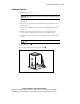
DIMM Installation Guidelines
You must observe the following guidelines when installing additional
memory:
■ Only install 133-MHz registered SDRAM, 3.3-V, 72-bit wide, ECC
DIMMs in the ProLiant DL380 Generation 2 server.
■ Only install identical DIMMs as pairs.
■ Populate both slots in a bank at the same time.
NOTE: The server ships with at least two DIMMs installed in DIMM slots 1A and 4A.
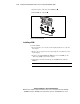
■ To ease successive DIMM installation, install the DIMMs in the paired
banks in sequential order. Install the second pair of DIMMs in slots 2B
and 5B; then, install the third pair of DIMMs in slots 3C and 6C.
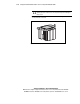
CAUTION: Use only Compaq DIMMs. DIMMs from other sources are known to
adversely affect data integrity.
For online spare memory support, you must observe the following additional
guidelines:
■ The ROM must be up to date.
■ The health driver must be installed and operating properly.