
Compaq ProLiant DL380 Generation 2 Setup and Installation Guide




Installing Hardware Options 3-19
Compaq Confidential – Need to Know Required
Writer: Rob Weaver Project: Compaq ProLiant DL380 Generation 2 Server Setup and Installation Guide Comments:
Part Number: 203844-001 File Name: d-ch3 Installing Hardware Options.doc Last Saved On: 4/5/01 1:55 PM
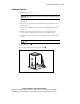
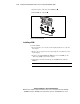
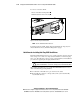
5. Insert the PPM into the PPM slot .
6. Press down firmly. When the PPM seats fully in the slot, the latches
close
.
2
1
2
Figure 3-17. Installing a PPM
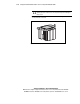
7. Install the access panel. See the “Installing the Access Panel” section in
this chapter.
Memory
You can expand server memory by installing Compaq SDRAM. The system
supports up to six 133-MHz ECC registered SDRAM DIMMs.
The ProLiant DL380 Generation 2 server can be configured in two modes:
■ Standard ECC mode—DIMMs installed in pairs provide up to 6 GB of
memory
■ Online spare mode—DIMMs installed in pairs simultaneously support
up to 4 GB of memory and up to 2 GB of online spare memory
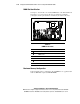
The following sections explain DIMM slot locations, configuration options,
and installation procedures.