
Compaq ProLiant DL380 Generation 2 Setup and Installation Guide




3-18 Compaq ProLiant DL380 Generation 2 Server Setup and Installation Guide
Compaq Confidential – Need to Know Required
Writer: Rob Weaver Project: Compaq ProLiant DL380 Generation 2 Server Setup and Installation Guide Comments:
Part Number: 203844-001 File Name: d-ch3 Installing Hardware Options.doc Last Saved On: 4/5/01 1:55 PM
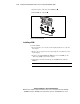
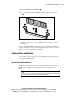
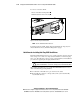
3. Open the latches on the sides of the PPM slots .
4. Lift the PPM out of the slot .
1
2
1
Figure 3-16. Removing a PPM
Installing a PPM
To install a PPM:
1. Power down the server. See the “Powering Down the Server” section in
this chapter.
2. Remove the access panel. See the “Removing the Access Panel” section
in this chapter.
3. If there is an existing PPM in the PPM slot, remove the PPM. See the
“Removing a PPM” section in this chapter.
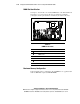
4. Align the key slot in the bottom edge of the PPM with the tab in the
PPM slot.
IMPORTANT: PPMs do not seat if turned the wrong way.