
Compaq ProLiant DL380 Generation 2 Setup and Installation Guide




Installing Hardware Options 3-17
Compaq Confidential – Need to Know Required
Writer: Rob Weaver Project: Compaq ProLiant DL380 Generation 2 Server Setup and Installation Guide Comments:
Part Number: 203844-001 File Name: d-ch3 Installing Hardware Options.doc Last Saved On: 4/5/01 1:55 PM
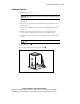
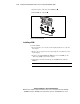
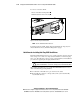
9. Align the heatsink with the guideposts on the socket and install the
heatsink
.
10. Carefully install the heatsink-retaining clip .
11. Close the locking lever on the heatsink-retaining clip .
1
2
3
Figure 3-15. Installing the heatsink and heatsink-retaining clip
CAUTION: PPM slots must be populated when processors are installed. If PPM
slots are not populated, the system may not function correctly.
12. Install a PPM in the corresponding PPM slot, if one is not already
installed. See the “Installing a PPM” section in this chapter.
13. Install the air baffle. See the “Installing the Air Baffle” section in this
chapter.
14. Install the access panel. See the “Installing the Access Panel” section in
this chapter.
Removing a PPM
To remove a PPM:
1. Power down the server. See the “Powering Down the Server” section in
this chapter.
2. Remove the access panel. See the “Removing the Access Panel” section
in this chapter.