
Compaq ProLiant DL380 Generation 2 Setup and Installation Guide




Installing Hardware Options 3-15
Compaq Confidential – Need to Know Required
Writer: Rob Weaver Project: Compaq ProLiant DL380 Generation 2 Server Setup and Installation Guide Comments:
Part Number: 203844-001 File Name: d-ch3 Installing Hardware Options.doc Last Saved On: 4/5/01 1:55 PM
Installing a Processor
To install a new processor:
IMPORTANT: When installing a new processor, also refer to the documentation that ships
with the processor.
1. Power down the server. See the “Powering Down the Server” section in
this chapter.
2. Remove the access panel. See the “Removing the Access Panel” section
in this chapter.
3. Remove the air baffle. See the “Removing the Air Baffle” section in this
chapter.
4. If there is an existing processor in the processor socket, remove the
processor. See the “Removing a Processor” section in this chapter.
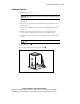
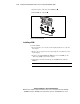
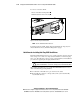
5. Align the notched corner of the processor with the notched corner of the
socket.
CAUTION: You must align the processor pins to seat the processor into the
socket.
6. Insert the processor .
7. Close the locking lever on the processor socket .
1
2
Figure 3-13. Installing the processor