
Compaq ProLiant DL380 Generation 2 Setup and Installation Guide


Installing Hardware Options 3-11
Compaq Confidential – Need to Know Required
Writer: Rob Weaver Project: Compaq ProLiant DL380 Generation 2 Server Setup and Installation Guide Comments:
Part Number: 203844-001 File Name: d-ch3 Installing Hardware Options.doc Last Saved On: 4/5/01 1:55 PM
1819 16
3 4
6
5
7
8
9
10
11
12
1314
17
16
20
1 2
1515
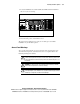
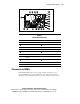
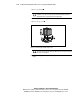
Figure 3-10. Identifying system board connectors
Table 3-1
System Board Connectors
Item Description Item Description
PPM slot 2 Diskette drive system connector
PPM slot 1 (populated) Battery
PCI riser cage connector Fan 6 connector
Smart Array 5i Controller System power connector
SCSI port 2 (internal) Processor socket 1 (populated)
Fan 3 connector Processor socket 2
LED/CD-ROM drive system
connector
DIMM slots (1A-6C)
Fan 4 connector Fan 2 connector
Power supply signal connector Fan 1 connector
Fan 5 connector SCSI port 1 (external VHDCI)
Processors and PPMs
ProLiant DL380 Generation 2 servers support single- and dual-processor
operation. With two processors installed, the server supports boot functions
through the processor installed in processor socket 1. However, if processor 1